Astrophotos · Rocket launches · Astronomy tools

Share your universe!

The social app for space lovers.

Share your astrophotos, follow every rocket launch, and plan your nights under the stars. One home for everyone who looks up: astrophotographers, telescope observers, launch fans and beginners who just unboxed their first scope.

No adverts. No algorithm. No noise.

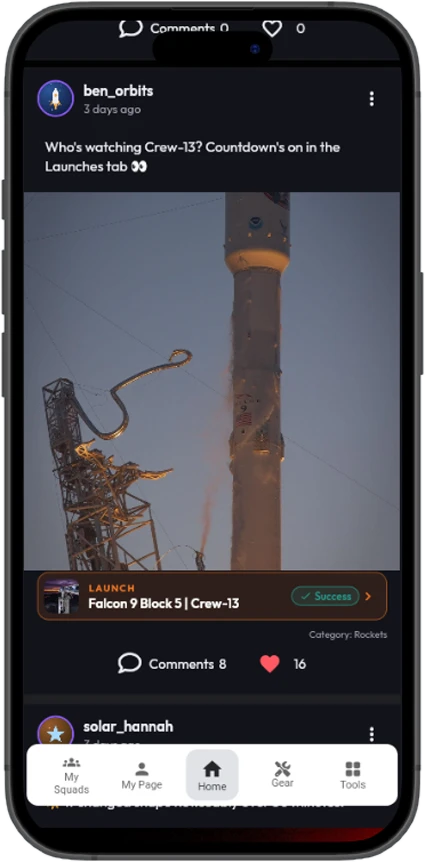
The Sky Feed with a post about Crew-13 linked to the launch
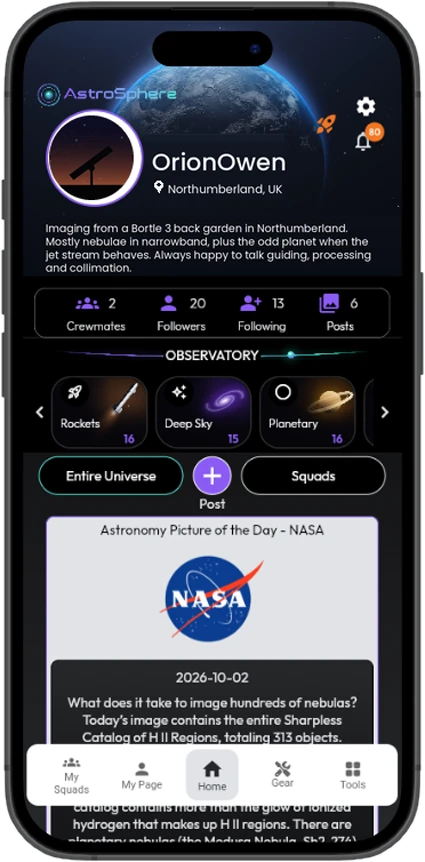
AstroSphere home screen with profile, bio, category tiles and NASA Picture of the Day
A community of space loversEvery rocket launch worldwideGear on every photo11 astronomy tools
You finally pull a spiral arm out of the noise. You post it, and your aunt comments “pretty!” while the algorithm buries it under a cat video.

You know the feeling. You stay up until 2am in the freezing cold, you nail the focus, you stack four hours of subs. AstroSphere is where that photo gets the audience it deserves.

Everyone in here knows what seeing conditions are, so there’s no need to apologise for the wobble or undersell your image. Tell the story behind it: the setup, the struggle, the moment it all came together. It’s exactly what this community loves to read. Beginners are welcome too: if you’re wondering whether that fuzzy blob was the Andromeda Galaxy, it probably was. It only gets better from here.

And it isn’t only for imagers. Visual observers, first-time telescope owners and rocket-launch fans are all at home here. Follow every launch around the world, and plan your nights with eleven astronomy tools, in the same app you share your results in.

No noise. No strangers. No algorithm deciding your galaxy isn’t engaging enough. Just space, and the people who love it.
Why AstroSphere

The big networks weren’t built for you.

They were built to hold anybody’s attention for as long as possible. A love of space is slow and patient: long nights at the eyepiece, hours of imaging, launches that slip a day and go the next. It was never going to win that fight. Here’s what’s different.

Everyone here loves space

No crossover content. No adverts between the nebulae. No politics, no drama, no influencers. Open the app and it’s wall-to-wall space, every time.

You see the sky you asked for

Your feed isn’t a slot machine. It’s sorted newest first and filtered by you. Tap Planetary and that’s all you see. No mystery ranking.

Your gear is part of the conversation

Every post can carry the telescope and camera that took it. “What did you shoot that with?” is already answered on the post.

Real conversations, properly threaded

Comments nest into replies, and replies into replies, so a back-and-forth about guiding errors, or a detailed collimation conversation, stays readable.

Small rooms, not a stadium

Squads gather your local club, your imaging buddies, or the various other people obsessed with solar prominences, each with a private feed.

You’re in charge of your own peace

Your account can be private. You choose exactly which notifications reach you. Nothing is turned on behind your back.

It isn’t a bigger social network. It’s a smaller, better one, and that’s precisely the point.

The Sky Feed

Your window to the universe.

The Sky Feed is the heart of AstroSphere. It’s where everything the community captured last night lands. Across the top sit the category filters. One tap and the whole feed narrows. With ISS and Rockets alongside the astronomy categories, it’s a home for spaceflight fans too.

  • Entire UniverseEverything, from everyone
  • Deep SkyGalaxies, nebulae, clusters, everything faint and far away
  • PlanetaryJupiter’s belts, Saturn’s rings, the Martian polar caps
  • LunarThe Moon in all her phases, craters and terminator detail
  • SolarSunspots, prominences, white light and hydrogen-alpha
  • ISSSpace station passes, trails and transits
  • RocketsLaunches, launch trails and the hardware behind them. Link a post to the exact launch it shows.
  • MiscellaneousAurorae, meteors, kit shots, nightscapes and happy accidents
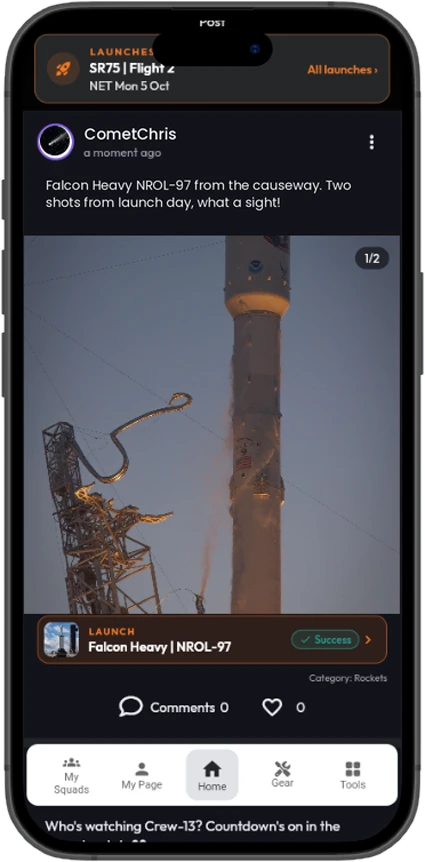
The Sky Feed with a Falcon Heavy launch photo linked to its launch
The Sky Feed. Full-width photos, newest first.
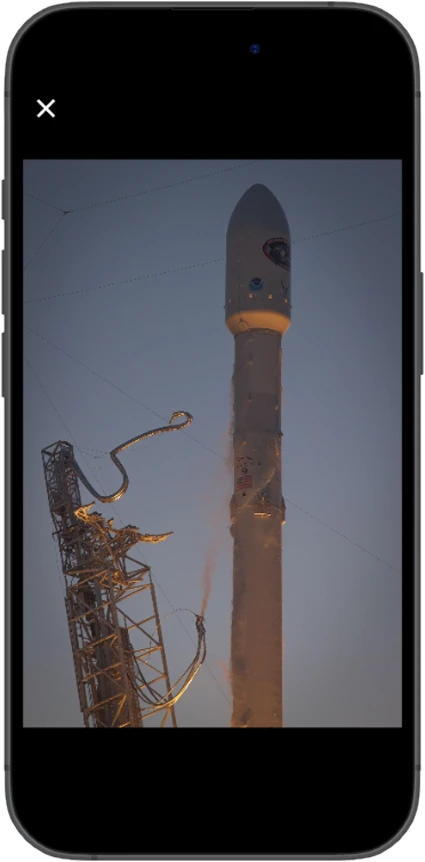
The Falcon Heavy launch photo opened full screen
Tap any photo to see it full screen.
Share what you caught

From the back garden to the Sky Feed in three steps.

Tap the +Post button and you’re away. Write as much or as little as you like, add a single photo or a whole set from one session, and pick the category it belongs in. Change your mind later? Every post can be edited or deleted. No typo lives forever.

Caught a launch? In the Rockets category you can link your post to that specific launch, and it also appears in the launch’s own Community section.

Swipe to see each step

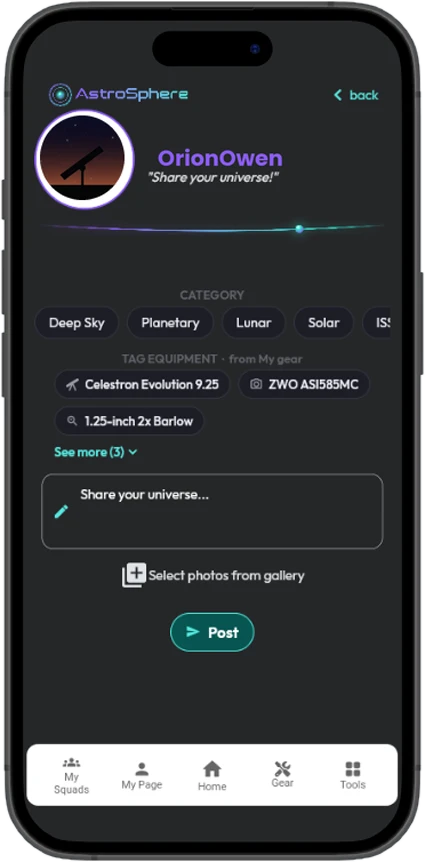
Create post screen with category chips, gear tags from My Gear, and a caption box
1Pick a category

Where does it belong?

Deep Sky, Planetary, Lunar, Solar, ISS, Rockets or Miscellaneous.

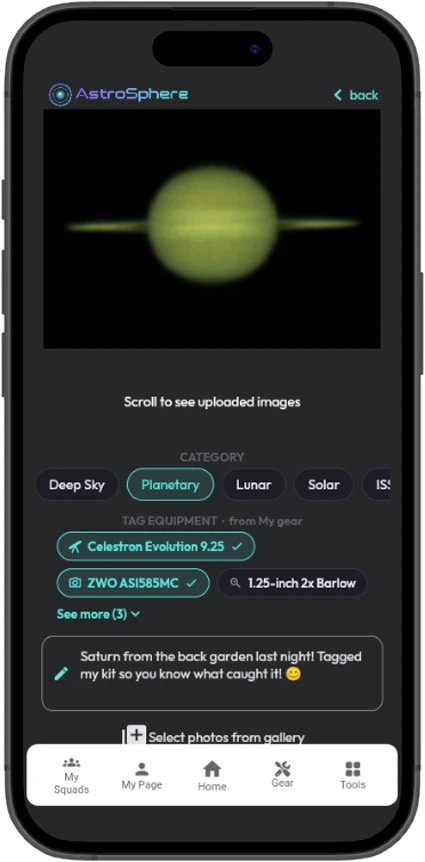
Create post with an eclipse photo uploaded, Lunar selected and a telescope tagged
2Add photos, tag the gear

Your kit is one tap away

Add a single photo or a whole session, then tag your telescope, camera and more straight from My Gear.

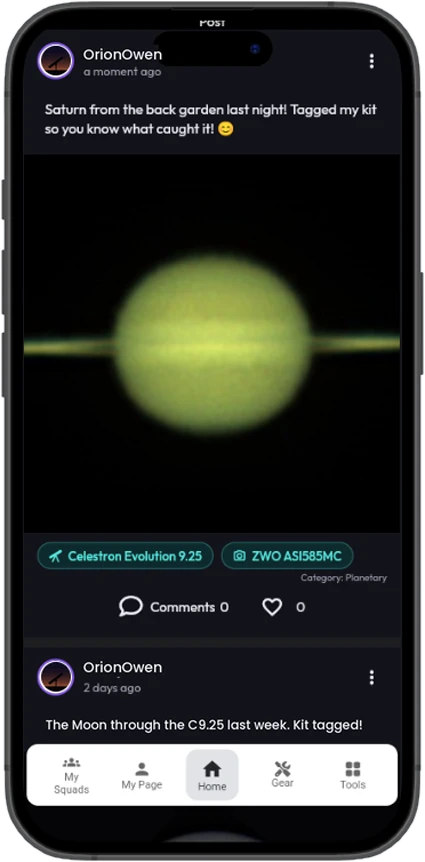
The new Saturn post in the feed with the telescope and camera tagged
3It’s in the feed

The photo carries its own story

Everyone sees what that scope, with that camera, can actually do.

It turns the feed into the most honest gear review anywhere: thousands of real results from real back gardens, not marketing renders.

Likes & comments

Talk about it properly.

Give a post a like, and tap the count to see everyone else who did. Then join the conversation.

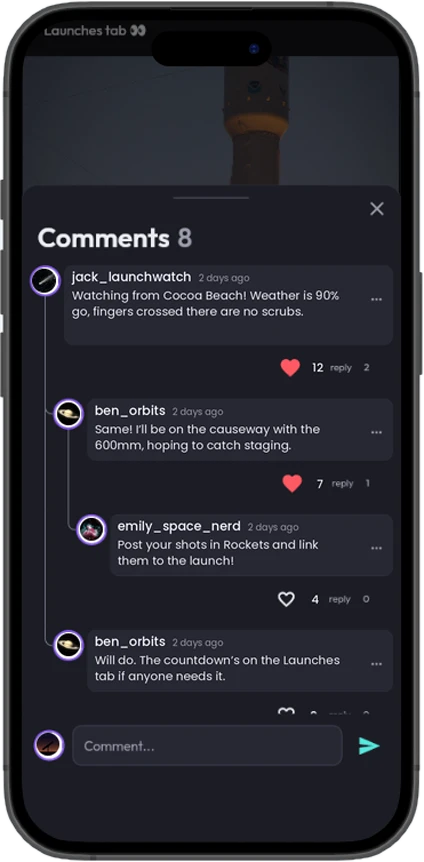
  • Threaded replies. Comments thread into replies, and replies thread again, so a detailed discussion about collimation or flat frames stays neat and easy to follow.
  • Likes on comments too. A genuinely helpful answer rises to the top where the next person will find it.
A threaded comment conversation about solar imaging under a prominence photo
Launches

Every rocket launch, in your pocket.

AstroSphere has a whole area dedicated to spaceflight, one tap from the rocket button on the main feed. See what’s launching next anywhere in the world, count it down to the second, then see how it went.

Swipe to see more

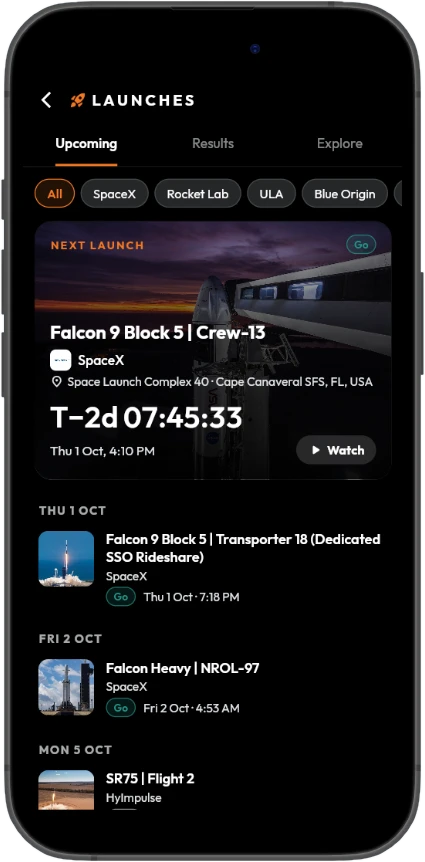
Launches Upcoming tab with the next launch countdown card: Falcon 9 Crew-13, T-2 days
1Next launch

A live countdown

The next launch gets a big card with a T-minus countdown ticking every second, plus the rocket, mission, provider and launch pad.

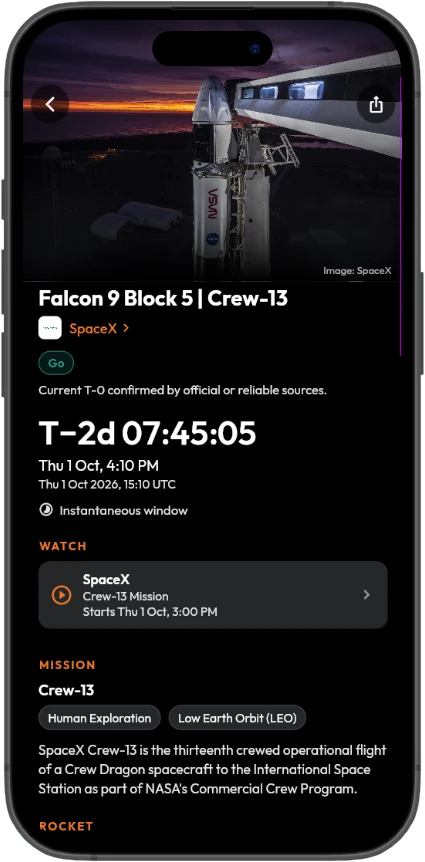
Launch detail page for Crew-13 with countdown, Go status, webcast link and mission
2Every launch, in detail

Everything about the flight

The mission and target orbit, the rocket, the launch site on a map, the launch window, the weather forecast, links to the live webcast, and the result afterwards.

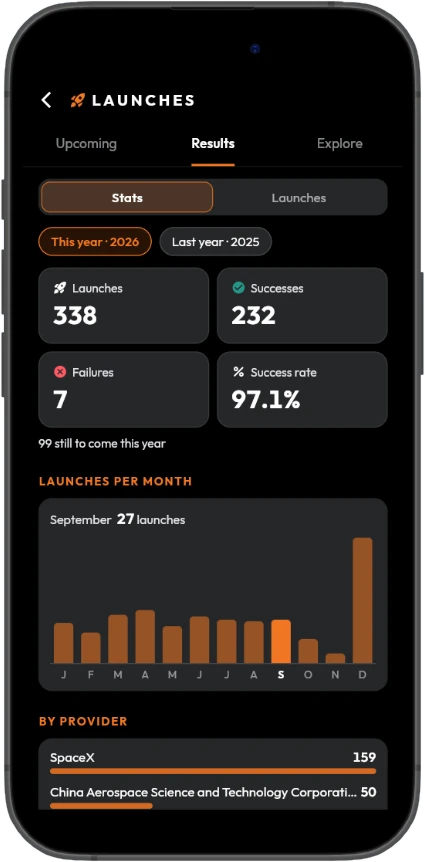
Launch statistics for 2026: launches, successes, failures, success rate and launches per month
3Results and statistics

History back to 1957

Filter every launch since 1957 by year, provider, result or crewed missions, and see launches per year and per month, success rates and rankings.

Launches from SpaceX, Rocket Lab, ULA, Blue Origin, China, Europe (Arianespace and ESA), India (ISRO), Japan (JAXA), Russia and more, shown in your local time.

GoTBCHoldIn FlightSuccessFailure

Upcoming, worldwide

Filter by provider, crewed missions only, or launches with a precise time only. The status of each launch is clear at a glance.

A page for every launch

Mission, orbit, rocket, pad on a map, launch window, a weather forecast such as “90% go”, webcast links and the result.

Results and archive

Launch history going back to 1957, filtered by year, provider, result and crewed missions.

Statistics

Launches per year and per month, the success rate, and rankings by provider and by country.

Explore

Rockets with their specs (height, mass, payload to orbit, thrust, first flight) and launch record, launch sites on a world map, and launch providers with their history and upcoming launches.

Watch it together

Every launch has a Community section with the posts linked to it, and a launch-day banner appears on the main feed when a launch is only hours away.

Swipe to see more

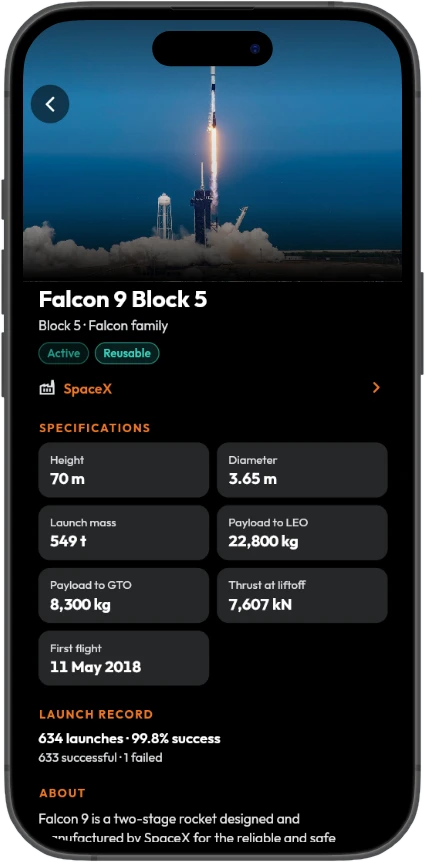
Falcon 9 Block 5 rocket page with specifications and launch record

Explore the rockets

Specs and the full launch record for each rocket.

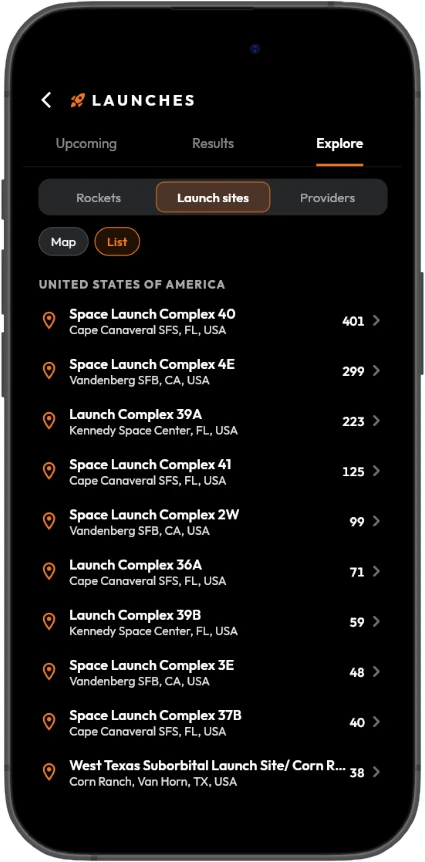
Launch sites list with the number of launches from each pad

Every launch site

On a world map or as a list, with the number of launches from each pad.

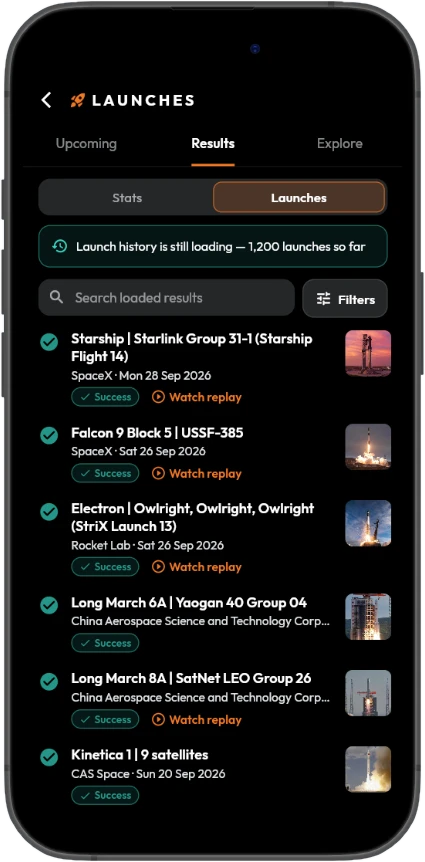
Recent launch results with success badges and replay links

Every result, with replays

See how each launch went, and watch the replay.

Launch schedules are kept up to date automatically, so what you see is what’s on the pad.

Launch data provided by The Space Devs (Launch Library 2).

My Gear

Your kit, catalogued. Build it once.

No other social app has anything like this, because no other social app was built for people who own seven eyepieces and can tell you the focal length of each one. Choose your telescopes, cameras, mounts, eyepieces, Barlows, reducers and filters from a built-in catalogue of more than 3,400 items with their specifications, or enter your own.

Telescopes refractors, reflectors, Dobsonians, SCTsCameras astro cams, DSLRs, planetary, guideEyepieces every focal lengthMounts EQ, alt-az, tracking, GoToFilters LP, narrowband, solar, colourBarlows & reducersAccessories finders, focusers, dew heaters

Swipe to see each step

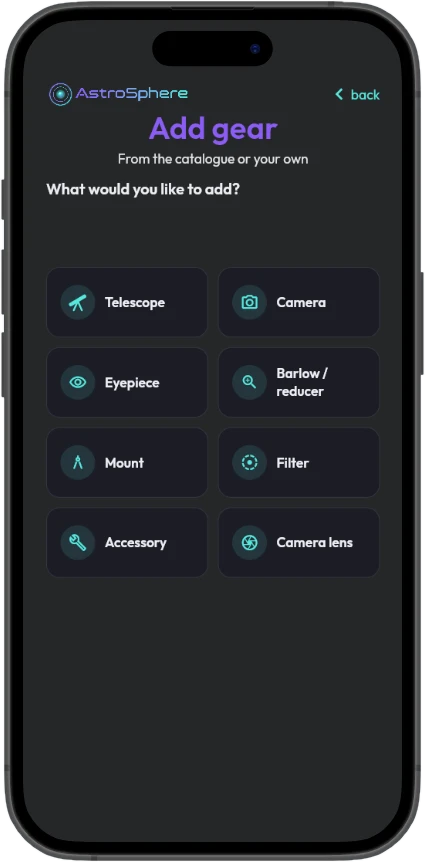
Add gear screen: telescope, camera, eyepiece, Barlow or reducer, mount, filter, accessory or camera lens
1Choose what to add

Every kind of kit

Telescopes, cameras, eyepieces, Barlows and reducers, mounts, filters, accessories and camera lenses.

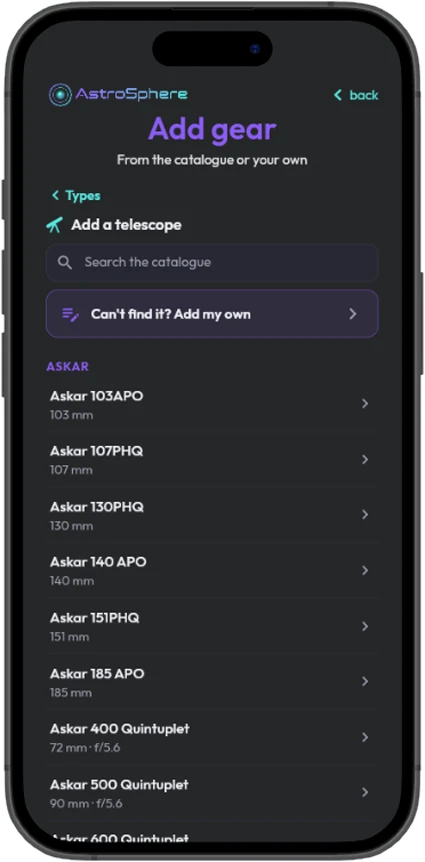
Telescope catalogue listing Askar models, with a search box and an add-my-own option
2Search the catalogue

Find your exact model

More than 3,400 items with their specifications. Can’t find it? Add your own.

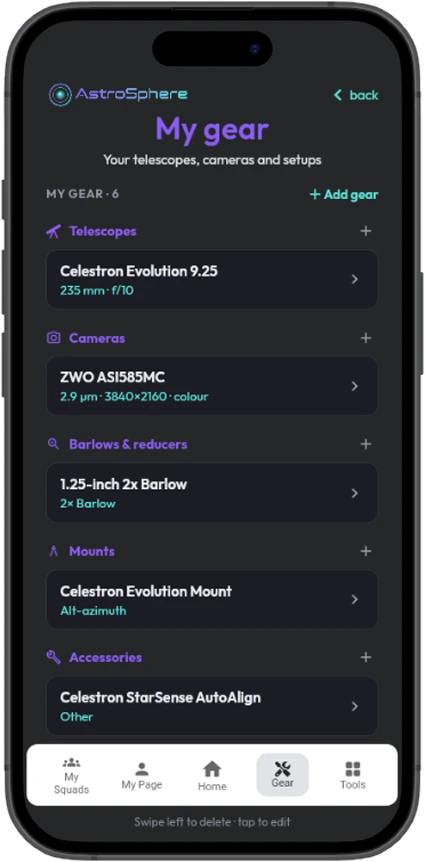
My Gear list with a telescope, camera, Barlow, mount and accessory
3Your gear, saved

Ready when you are

Tag it on posts and use it in the calculators. Swipe to delete, tap to edit.

  • Your posts tag themselves. Once your kit is saved, tagging it on a post is a single tap. No typing out model numbers at 3am.
  • Your tools already know your kit. Your saved gear and setups plug straight into the tools, so there’s nothing to type in. Every calculation adjusts to your setup automatically.
  • Save as many setups as you like. Save combinations such as “C8 + ASI462MC + 2.5× Barlow” and switch between them with a tap.
  • People can see what you work with. When someone loves your Orion Nebula shot, the answer to “how?” is already waiting for them.
  • Buying decisions get easy. Thinking about a new scope? See what people with that exact scope are producing under real skies.
  • It connects you to people like you. Same mount, same camera, same frustrations. That’s how the best advice in this hobby gets passed along.

Set your kit up once and you’re good to go. No further input required.

Squads

Find your people. Astronomy has always been a club hobby.

A Squad is a group with its own name, picture, description and private feed. Think of it as a room inside AstroSphere where a particular crowd gathers.

Swipe to see each step

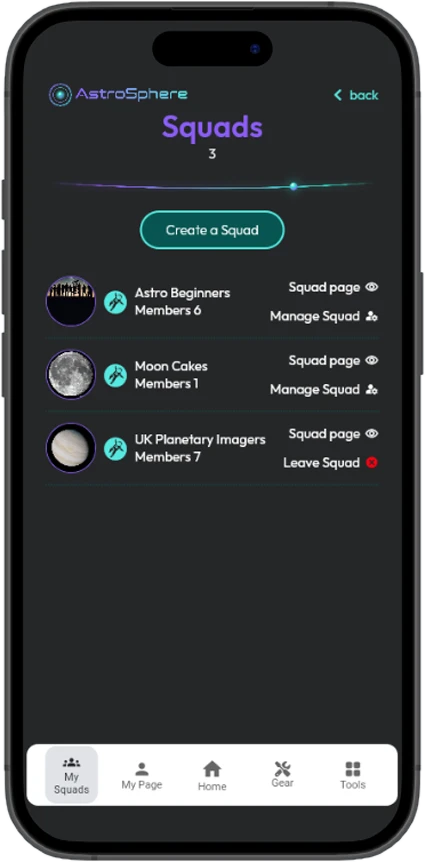
Squads list with Astro Beginners, Moon Cakes and UK Planetary Imagers
1Find one to join

Search Squads by name

Your local society, a Dobsonian owners’ group, the narrowband crowd. Join, or send a request to a private Squad’s owner.

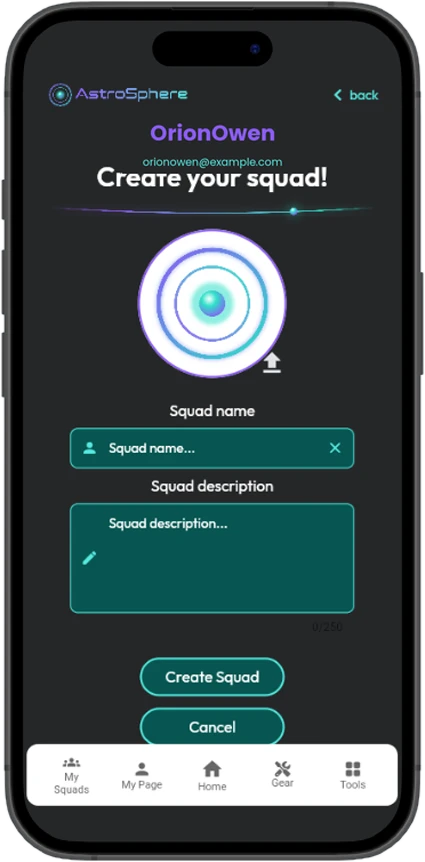
Create your squad screen with picture, name and description
2Or start your own

It exists in a minute

Give it a name, write a line about what it’s for, pick a photo. You’re the owner.

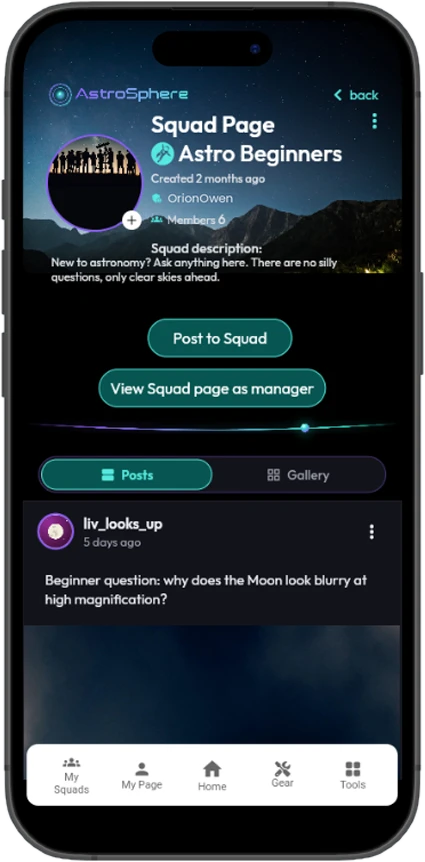
Astro Beginners squad page with its description, Post to Squad button and the squad feed
3Post inside it

A private feed for your crowd

Session reports, questions and dark-sky trip plans. What’s said in the Squad stays in the Squad.

Running a Squad

Run it well.

Owners get a manager’s view of their Squad.

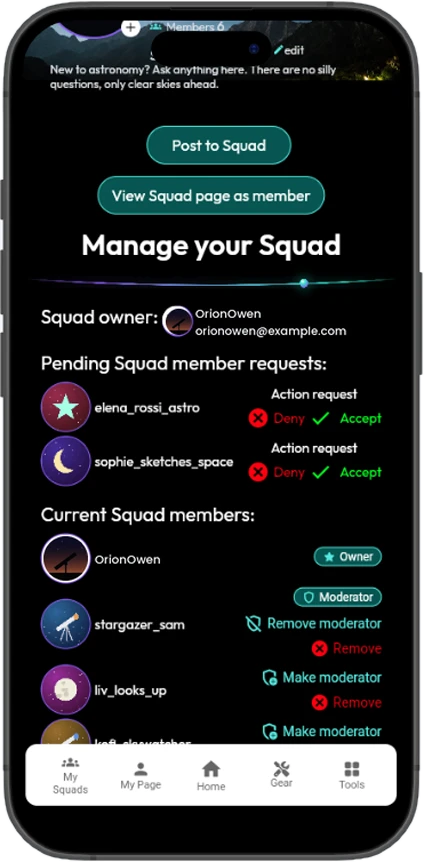
  • Approve or decline the people knocking at the door, so private groups stay genuinely private. They’re notified the moment you accept.
  • Appoint moderators to help keep things friendly, and remove anyone who doesn’t belong.
  • Join as many Squads as you like. Your Squad list keeps them one tap from the home screen, and Leave Squad is always one tap away, no awkwardness required.
Manage your Squad view with pending requests to accept or deny, and current members with moderator controls
The owner’s view: accept requests and manage members.
Crewmates & followers

Two ways to connect, because not every connection means the same thing.

  • Crewmates are your inner circle. A mutual connection you both agreed to. You send a request, they accept. These are the people you’d text at midnight when the clouds finally break.
  • Following is lighter. See someone whose imaging is extraordinary? Follow them and they’re added to your Following list, giving you easy access to their profile and posts. No request, no obligation, no need for them to follow back.
  • Search by name to find friends from your local club, or the imager whose work you keep admiring.
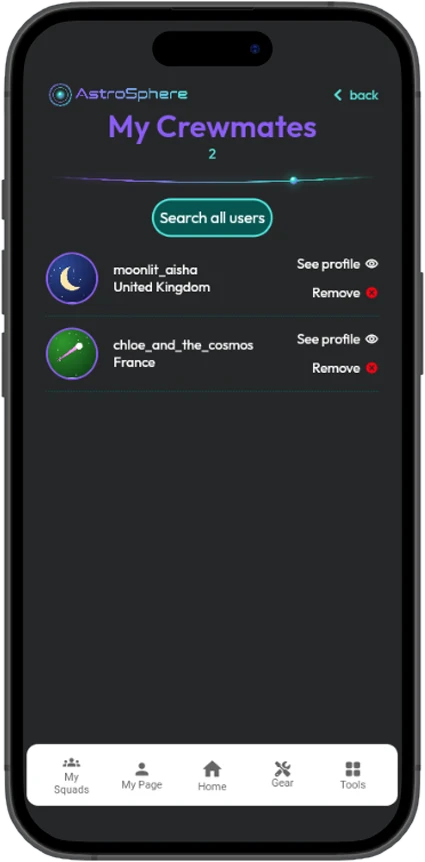
My Crewmates screen listing crewmates with their countries
My Crewmates, with a link to each profile.
Your profile

Your profile is your observatory.

It’s where the community gets to know you, and it’s genuinely lovely to scroll back through a year of your own posts and see the improvement. That first wobbly Moon shot never stops being a good story.

  • Your name and profile picture. Make it one of your own shots.
  • A bio and your location, so people can find observers near them.
  • A gallery of your best work, your full equipment list, and everything you’ve posted.
  • Private if you want to be. Only people you approve see what you share. Edit your profile or close your account from your own settings. No emails to support, no hoops.
My Page with profile photo, location, bio and counts
My Page: your bio, your counts and everything you’ve posted.
A daily dose of wonder

NASA’s Astronomy Picture of the Day, built right in.

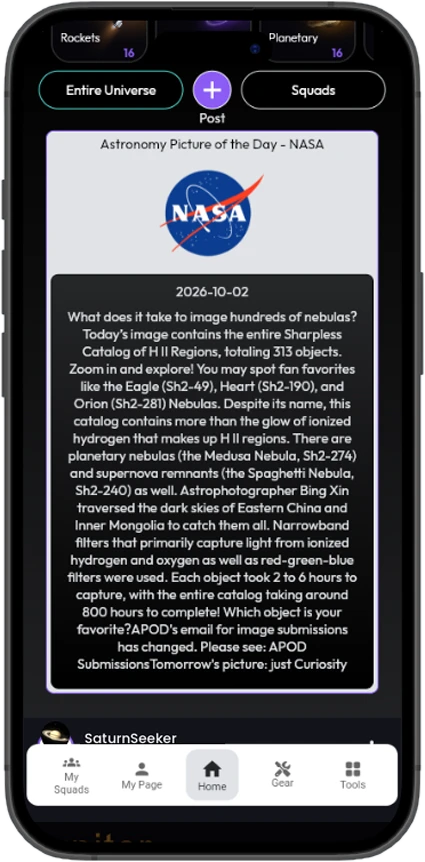
Every day NASA publishes an extraordinary image of the cosmos with an explanation written by professional astronomers. AstroSphere brings it to the top of your feed: the picture, the title and the story behind it.

It’s a free astronomy lesson every morning. Some days it’s a Hubble masterpiece, some days it’s an amateur’s shot that stopped NASA in their tracks.

NASA Astronomy Picture of the Day card on the home screen
Picture of the Day, at the top of your feed every morning.
Notifications

Notifications that respect you.

AstroSphere tells you when something genuinely involving you happens. And you stay in control: you choose which of those reach you.

  • Someone liked your post, commented, or replied to your comment
  • Someone started following you, or wants to be your crewmate
  • Your Squad request was accepted, or politely declined

Every type can be switched off individually. An unread badge keeps count, and one tap on Mark all seen clears the decks when you come back from holiday.

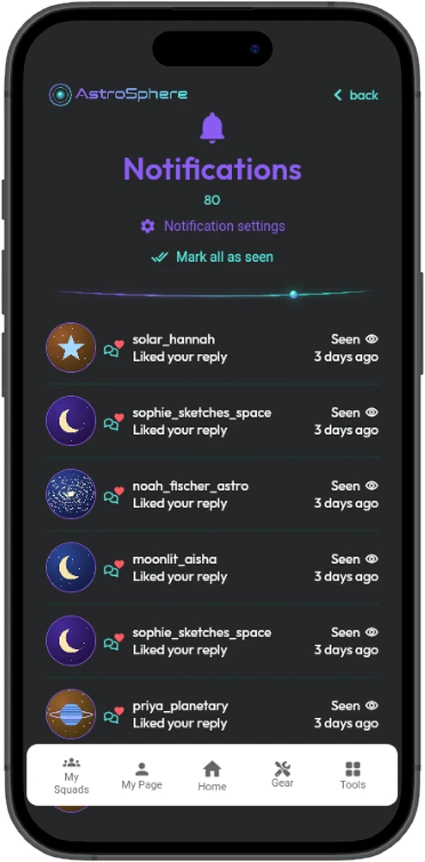
Notifications screen showing who liked your replies
Notifications, with new items marked until you’ve seen them.
The small things

The small things that make it pleasant.

Dark styling throughoutDesigned to be read in a dark room without ruining your night vision.
Pull down to refreshSee what’s arrived since you last looked.
Edit or delete anythingAnything you’ve posted, any time.
SearchFind people and Squads by name.
Easy in, easy outSign up in seconds, and delete your account just as easily.
AstroSphere Tools

Every astronomy tool you need, in one app.

AstroSphere is free: share your photos, tag your gear, join Squads and follow every rocket launch. Add the optional [AstroSphere Tools] subscription and the same app becomes your astronomy toolkit too. Plan tonight’s session, check your equipment, capture, then post the results, all without switching apps.

Free the social app and Launches+ [AstroSphere Tools] 11 tools for [£X.XX / month]
Who it’s for

You don’t need to own a telescope to belong here.

If you’re brand new

This is the friendliest place to start. Ask the questions you’re embarrassed to ask, and see what people with your budget are managing. Post that first slightly blurry Moon shot. Everyone here has one.

If you’re an astrophotographer

Your work is understood here. Tag your rig, compare notes on the same targets, and build a gallery that shows years of getting better at a very hard thing.

If you observe visually

No camera required. Describe what you saw, share a sketch, talk about the night the Veil Nebula finally appeared.

If you’re in a club or society

Make it a Squad. Post session reports, organise dark-sky trips and keep the group talking between meetings, all in one private space.

If you follow spaceflight

Every upcoming launch worldwide with a live countdown, the results afterwards, and a community to watch it with. Post your own launch photos in the Rockets category.

If you’re just curious about space

Follow people whose work amazes you, and let NASA’s picture of the day quietly make your mornings better.

AstroSphere app icon

Clear skies. We’ll see you up there.

Astronomy is the oldest science there is, and the one that still makes grown adults gasp out loud in a cold field at 2am. It deserves better than being an afterthought on a generic social media platform that wasn’t built for it. So here’s AstroSphere: built for space lovers, from the first wobbly Moon shot to the next launch on the pad.

Support

Need a hand?

Questions, bug reports, or a request to remove content or data: email us and we’ll get back to you as soon as we can.

support@astro-sphere.co.uk
How do I delete my account?

Open My Page, choose Edit Profile, then Delete account. Your profile, posts, comments and equipment list are removed. If you can’t sign in, email us from the address on your account.

How do I make my account private?

Switch your account to private in your profile settings. Only people you approve can then see what you share. You can switch back at any time.

How do I choose which notifications I get?

Open Notifications and tap Settings. Every notification type can be switched on or off on its own.

How do I report a post or user?

Email us with the username and a description of the post. We review every report.

I forgot my password

On the Sign In screen tap “Forgot password?” and we’ll email you a reset link.